Many times in a web mapping application it is desired to save a picture with the current map information.Those who works with Google Maps API has also the >Static Maps API, which works similarly than Google Maps but produces static images.
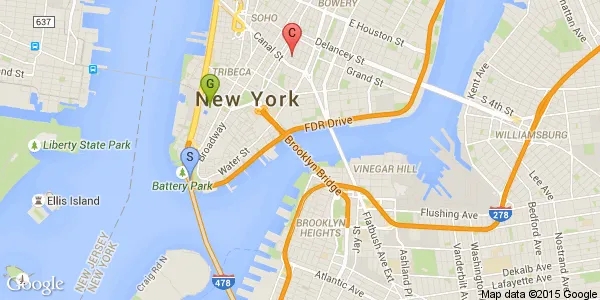
For example, next call:
http://maps.googleapis.com/maps/api/staticmap?center=Brooklyn+Bridge,New+York,NY&zoom=13&size=600x300&maptype=roadmap
&markers=color:blue%7Clabel:S%7C40.702147,-74.015794&markers=color:green%7Clabel:G%7C40.711614,-74.012318
&markers=color:red%7Ccolor:red%7Clabel:C%7C40.718217,-73.998284&sensor=false
produces the image:
Unfortunately, using libraries other than Google Maps, like OpenLayers or Leaflet, there is no similar solution. Probably the best, simple and powerful one, is to install a plugin on your browser to take screenshots. But well.. I think that does not deserve to write a post :p
How to render a web page element to an image?
After writing my last post (Taking Web Page Screenshots), where I show to to take a screenshot of a whole page, I was thinking on using PhantomJS to render only a portion of a page to an image.
The PhantomJS’s WebPage object has a clipRect property which determines the portion of the web page that must be rendered. With this in mind we can see a solution could be:
- Get the bounding rectangle of the desired DOM element to be rasterized.
- Set the
clipRectproperty - Render the page to a file.
For that purpose I have prepared a little JavaScript application to run with PhantomJS. Its usage is as follows:
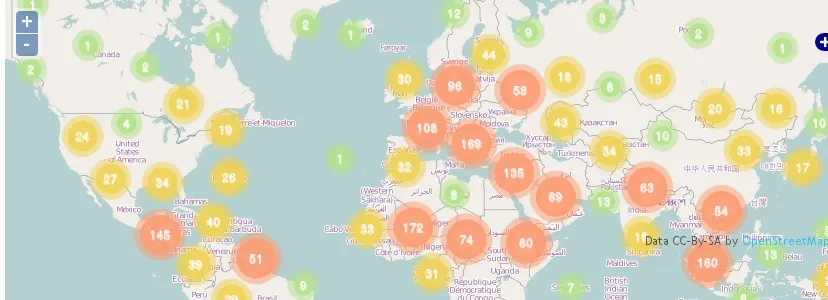
./bin/phantomjs ./examples/rasterize_element.js URL output_file selectorFor example, the next execution against the demo of Animated Cluster Strategy for OpenLayers selecting the first map:
./bin/phantomjs ./examples/rasterize_element.js http://www.acuriousanimal.com/AnimatedCluster map.png '#map1'Produces the image:
Next is the whole code of the program (called rasterize_element.js and based on the rasterize.js application attached on the PhantomJS package):
Note: The code is accesible at GitHub:Gist.
var page = require("webpage").create(),
  system = require("system"),
  address,
  output,
  size;

if (system.args.length < 4 || system.args.length > 6) {
  console.log(
    "Usage: rasterize_element.js URL filename selector [paperwidth*paperheight|paperformat] [zoom]"
  );
  console.log(
    '  paper (pdf output) examples: "5in*7.5in", "10cm*20cm", "A4", "Letter"'
  );
  phantom.exit(1);
} else {
  address = system.args[1];
  output = system.args[2];
  selector = system.args[3];
  page.viewportSize = { width: 600, height: 600 };
  if (system.args.length > 3 && system.args[2].substr(-4) === ".pdf") {
    size = system.args[3].split("*");
    page.paperSize =
      size.length === 2
        ? { width: size[0], height: size[1], margin: "0px" }
        : { format: system.args[3], orientation: "portrait", margin: "1cm" };
  }
  if (system.args.length > 4) {
    page.zoomFactor = system.args[4];
  }
  console.log("Loading page...");
  page.open(address, function (status) {
    if (status !== "success") {
      console.log("Unable to load the address!");
    } else {
      window.setTimeout(function () {
        console.log("Getting element clipRect...");
        var clipRect = page.evaluate(function (s) {
          var cr = document.querySelector(s).getBoundingClientRect();
          return cr;
        }, selector);

        page.clipRect = {
          top: clipRect.top,
          left: clipRect.left,
          width: clipRect.width,
          height: clipRect.height,
        };
        console.log("Rendering to file...");
        page.render(output);
        phantom.exit();
      }, 200);
    }
  });
}
Alternatives and references
Of course I’m not the first one that has explore this issue. A nice snippet from n1k0 can be found at GitHub:Gist. It does more or less the same as the code shown in this post.
Another alternative is the use of CasperJS. As its home page says:
CasperJS is an open source navigation scripting & testing utility written in Javascript and based on PhantomJS — the scriptable headless WebKit engine. It eases the process of defining a full navigation scenario and provides useful high-level functions, methods & syntactic sugar for doing common tasks such as:
- defining & ordering browsing navigation steps
- filling & submitting forms
- clicking & following links
- capturing screenshots of a page (or part of it)
- testing remote DOM
- logging events
- downloading resources, including binary ones
- writing functional test suites, saving results as JUnit XML
- scraping Web contents
With CasperJS capturing a page element is as easy as:
casper.start('http://www.weather.com/', function() {
    this.captureSelector('weather.png', '.twc-story-block');
});
casper.run();