In the last years JavaScript has become one of the most important programming languages. Probably one of the most famous words related to JavaScript is AJAX (Asynchronous JavaScript and XML). Request from JavaScript are made through the XmlHttpRequest JavaScript object which lets you open connections, send the request and handle data returned by the server. This post is about XMLHttpRequest object, how to use it and how to handle data in a synchronous or asynchronous way.
Creating a XMLHttpRequest instance
Usually the way to create a XMLHttpRequest instance is simply using:
var req = new XMLHttpRequest();but unfortunately this can’t work in old versions of Internet Explorer. In IE6 and earlier, XMLHTTP was implemented as an ActiveX object provided by Microsoft XML (MSXML). Beginning with IE7 XMLHTTP is also exposed as a native scripting object. As simple code to solve this:
XMLHttpFactories = [
  function () {
    return new XMLHttpRequest();
  },
  function () {
    return new ActiveXObject("Msxml2.XMLHTTP");
  },
  function () {
    return new ActiveXObject("Msxml3.XMLHTTP");
  },
  function () {
    return new ActiveXObject("Microsoft.XMLHTTP");
  },
];

function createXHRObject() {
  var xhrobject = null;
  for (var i = 0; i < XMLHttpFactories.length; i++) {
    try {
      xhrobject = XMLHttpFactories[i]();
    } catch (e) {
      continue;
    }
    break;
  }
  return xhrobject;
}

var req = createXHRObject();
The XMLHttpRequest methods
Now we know how to get a fresh instance we need to know a bit more about it, how to make requests and how to handle responses.
Note: Visit the W3C page, referenced below at references section, for a more in depth detail explanation.
Controlling request metadata variables
When making request we could be interested to control things like: target url, the http method used to make the request, set any http header parameter, set the data to be sent, etc Next is a brief description of the methods that allows us to do that.
- open(method, url, async, user, password): opens a HTTP connection using any available http method (GET, POST, PUT, DELETE, …) to the specified url. The flag async specifies if the request must be done asynchronously or synchronously.
- setRequestHeader(header, value): allows us to set any desired HTTP header in the request.
- send(data): while open sets the connection to a server, the send method is which really initiate the request (read the W3C document patiently, the send method is the key and has lot of thing to be known).
- abort(): allows to cancel the request.
Handling response data
Once a request is sent we get a response object (don’t worry you’ll some samples in a while). This object has the next important methods and attributes:
- status: if the request is done it returns the HTTP status code (read carefully the documentation at W3C, there is more than I’m talking here).
- statusText: similar to the previous attribute, it returns the status textual representation.
- getResponseHeader(header): allows to get the specified HTTP response header.
- getAllResponseHeaders(): similarly this get all headers.
- responseText/responseXML: contains the response.
Examples: lets play
The most used http methods in AJAX are by far GET and POST, so lets go to take a look on how to use them.
Synchronous request using GET
Next code shows a synchronous request to get content via GET method. It is important to note the ‘send’ method blocks until the request is done. After that you can get the response data.
// The 'false' flag means it is a synchronous request
req.open("GET", "some_url", false);
// This is blocked until request is done and a response is ready
req.send(null);
// If things goes fine then get result
if (req.readyState == 4 && req.status == 200) {
  alert(req.responseText);
}
To ensure request was done successfully you need to check the readyState and status attributes. In addition, if you need to pass any arguments you can do attaching it to the URL (like a GET request on your browser):
req.open("GET", "some_url?param1=value1&m2=value2", false);Asynchronous request using POST
Now we are going to see the opposite sample. Next is an asynchronous request using POST method:
// The 'true' flag means it is an asynchronous request
req.open("POST", some_url, true);
// This is called once the request is done
req.onreadystatechange = function () {
  // If things goes fine then get result
  if (req.readyState == 4 && req.status == 200) {
    alert(req.responseText);
  }
};
// You must set the content type of the request.
req.setRequestHeader("Content-Type", "application/x-www-form-urlencoded");
// In a POST request data must go here
req.send("param1=value1&m2=value2");
The code has some important differences. First, in the ‘open’ method the flag is set to true to make it an asynchronous request. Second, in a POST request the data must be set in the ‘send’ method and you must explicitly specify the Content-Type of the data the request is sent. Finally, and the most important, the ‘send’ method doesn’t block the execution. The request is sent and code continues executing so we need to attach an event handler to the ‘onreadystatechange’, this way once the request is done our handler function is executed. Again we need to check the response readyState and status attributes before to getting the results.
Cross Domain Request
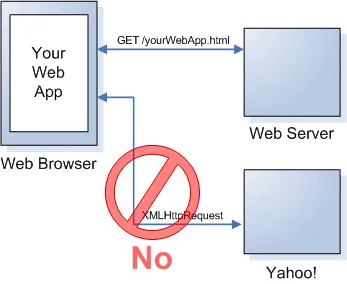
Maybe you are thinking XMLHttpRequest object is the solution to create a really rich internet application requesting data from any place and merging it all together in your own web page but… there are restrictions and cross site request(XSR) are one of them. These restrictions are based in the same origin policy.
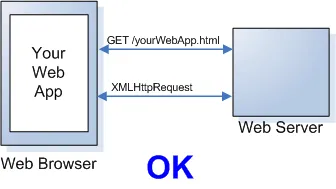
Basically, when you load a web page from a domain A and supposing that web page contains your JavaScript code, that code is restricted to make requests on the domain A:
You can’t make request from a page loaded on domain A to a domain B (your browser avoids it for security reasons):
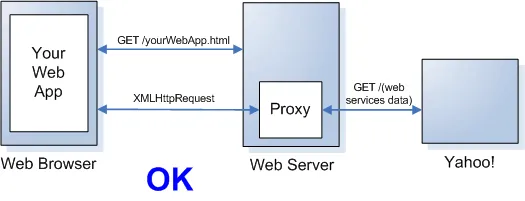
One way to solve it is using your web server (from where you load the web page) as a proxy server. You make the AJAX request to some place on your server and this makes the real request out and returns the results:
Next is a possible message you can get when doing cross domain request. Here I load a test page from my local server that tries to load a resource from acuriousanimal domain:
XMLHttpRequest cannot load http://www.acuriousanimal.com/. Origin http://localhost:8080 is not allowed by Access-Control-Allow-Origin.
Uncaught Error: NETWORK_ERR: XMLHttpRequest Exception 101
Cross Origin Resource Sharing and Access-Control-Allow-* headers
To allow cross domain request the so called Cross Origin Resource Sharing (CORS) specification was developed. To use it you need a compatible browser (at least IE8, Chrome 3, FireFox 3.5, Safari 4), otherwise any request to a different domain will simply throw an exception.
How does CORS work? CORS needs client/server cooperations. Before a request is sent the client (browser) adds the ‘origin’ HTTP header to the request with the url of the client. The server response must contain some Access-Control-Allow-* HTTP headers indicating which urls, methods or headers the client is allowed to user.
In the previous section sample error we have make a request to a server but our url isn’t listed in the Access-Control-Allow-Origin header. Take a look to the different headers you can use at server side to control which clients are allowed to use your services. Here I would like to point the two most used by me:
- Access-Control-Allow-Origin: can contain a list of client domains allows to make requests on your server.
- Access-Control-Allow-Methods: here you can specify which HTTP methods can be used (for example only allow GET).
References
- https://developer.mozilla.org/en/AJAX/Getting_Started - Mozilla’s “Getting started” tutorial.
- http://www.w3.org/TR/XMLHttpRequest - W3C XMLHttpRequest specification.
- http://msdn.microsoft.com/en-us/library/cc288060(VS.85).aspx - XDomainRequest object available on IE8.
- http://msdn.microsoft.com/en-us/library/ms537505(v=vs.85).aspx - About native XMLHttp implementation on IE.
- https://developer.mozilla.org/En/HTTP_Access_Control - HTTP access control. Very important for cross-site HTTP request.
- http://developer.yahoo.com/javascript/howto-proxy.html - Cross Domain Request using a proxy.